New Secure Boot Certificates
07/08/2026
New Secure Boot Certificates Are Being Rolled Out – What This Means For You
_________________________________________
What Is Going To Change?
_________________________________________
Microsoft introduced new Secure Boot certificates in 2023. The previous certificates were issued in 2011, and expired in June 2026.
As a result, new operating system releases can no longer be signed with the 2011 certificates. Operating system releases that were signed before the certificate expiration remain valid, provided the system firmware continues to trust the 2011 certificates.
Microsoft is distributing the 2023 Secure Boot certificates through Windows Update and has already begun rolling out the update. However, Microsoft has not published an exact timeline for when all systems will receive the new certificates. There is also no announced schedule for removing the 2011 certificates from systems. Their removal may occur through a future Windows Update or a by a firmware update. The timing of these changes is determined by Microsoft and/or the PC OEM.
_________________________________________
What Does This Mean For Our Users?
_________________________________________
Once a system's firmware and its Windows installation have been updated with the 2023 Secure Boot certificate, the Windows installation will boot only on systems whose firmware has also been updated with that certificate. If you try to boot the same Windows installation on a system with Secure Boot enabled, and the system firmware has not been updated, the boot process will fail.
From a backup and restore perspective, this means that if you create an image of a Windows installation that includes the 2023 certificate update and later restore it to a system with Secure Boot enabled that has not been updated, the restored system may fail to boot. In this case, please disable Secure Boot on the second system and update it as well.
We are taking every possible step to ensure that HDClone and other Miray® products continue to work as reliably as ever, while minimizing – or, whenever possible, preventing – potential side effects and compatibility issues. Despite our best efforts, it is not always possible to eliminate every potential effect, as some factors are beyond our control.
Should you encounter any unexpected behavior or have any questions, we will be happy to help you find a solution quickly and efficiently.
_________________________________________
Important Information Regarding UEFI Settings
_________________________________________
A recurring issue, primarily caused by Microsoft Windows and OEM hardware manufacturers, is the uncertainty surrounding Secure Boot certificates.
For several years now, Microsoft has used two signing keys – one for Windows boot files and another for boot files of all other vendors. In the beginning, any properly signed operating system would boot if Secure Boot was enabled in the BIOS or UEFI firmware. However, now some systems distinguish between Microsoft and 3rd party certificates.
Some hardware manufacturers configure their systems to enable only the Microsoft certificate by default. This can give the false impression that only this certificate provides a secure boot environment, even though the 3rd party certificate offers the same level of security: all 3rd party software vendors must meet the same certification requirements before they are permitted to sign their boot files.
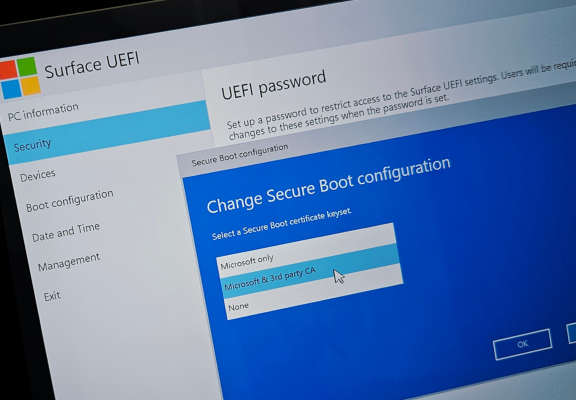
Secure Boot Settings in UEFI (BIOS)
We therefore recommend accessing your PC's UEFI (BIOS) menu* and changing the Secure Boot certificate configuration from Microsoft Only to Microsoft & 3rd party – either temporarily or permanently.
Because the 3rd party option also includes Microsoft, Windows will continue to boot normally. This setting provides the same security level while also ensuring compatibility with other signed OS and boot media.
*) Please refer to your PC manufacturer to find out how to access the UEFI setup of your system.
Do you have any questions, comments or feedback? Please let us know!
Your Team of Miray Software
News archive
2026
2025
2024
2023
2022
- HDClone X.4 for Early Adopters
- Release #2 of HDClone X.3 – Enhanced Features & Optimization
- HDClone X.3 Now Supports The Use of WIM Images
- HDClone X.3 Covers More Hardware Devices and OSes Than Ever Before
- Maximum Data Rescue with HDClone X.3
- HDClone X.3 - Benefit from Updating your Backup and Cloning Software Now!
2021
2010
2009
2008
2007
- RTOS Symobi on up to 32 processor cores
- Miray Software on SYSTEMS 2007
- New Version 3.2 of HDShredder
- New Version 3.5 of HDClone
- Symobi for everybody!
- HDClone Enterprise Edition now available
- Expansion of Miray Software
- HDClone Enterprise Edition
- HDClone 3.2 Copying Hard Disks with AHCI and Firewire